

If you are working in any business or corporate landscape, you may know very well the struggle behind managing the invoice workflow. Invoices may appear to be a simple file to someone not involved in the process, but when you enter the actual picture, the approvals, signatures, amendments, and document retention become the real challenge. In a typical invoice lifecycle, an invoice is prepared by the finance department, approved by managers, and signed by cutomers/vendors before processing the actual transaction. All this can be simplified by using an electronic signature process which enables clients to skip printing, scanning, emailing, and manual follow-ups.
If you are a business or a concerned person in a business looking for a digital invoice workflow in your organisation, tools such as signNow can be used to prepare documents, send them for signature, and maintain a clearer electronic record. For teams specifically working with Skynova invoices, a workflow built around Skynova invoice signing can make the transition from invoice preparation to completed transaction more structured.
Why Workflow matters in Invoice Signing
The invoice itself is generally not the hard part. The hard part is everything surrounding it. Someone has to check how much should be paid and the recipient, then approve it, and if needed obtain a signature and save the finished document. When these operations are performed in different emails and paper files, it is easy to forget which version has been approved.
eSignature workflows break these steps down into a process. Instead of viewing the signature as a single step, finance and operations teams can look at the entire transaction: prepare the invoice, assign the person who needs to sign, send the document, make sure that it’s signed and saved. This is especially useful in cases when invoices are part of huge processes and not simply a document to be signed.
What should an Invoice Signing Process include
A good invoice signing process consists of more than just having a signature spot. First, the document must contain the required information, which should be read by the recipient. Next, it’s critical to assign the right person to the document. In a workflow with several steps, an internal approver may have to act before the document goes to the external party.
The issue of security and getting keys in place needs to be checked. SignNow supplies certain features for that. For instance, it employs the TLS 1.2/1.3 standard for data transactions, AES-256 codec for data storage, audit logs, and two-factor authentication (2FA). Such measures are highly important for workflow documentation in case the compliance or finance department needs to check what happened with the finalised document.
Step 1: Invoice Preparation Before Sending
The first step is quality control. In particular, before sending an invoice for signing, it is important to check and ensure that all data, including the name of the company, recipient data, value, payment date, and other details, are correct in order not to convert the signing process into another round of editing.
In addition, it is a smart idea to use electronic document drafting software that will help manage the difference between information that must be stored and information that should remain to be filled in by the signer. For instance, the finance department can prepare an invoice with the transaction details inputted but with a signature and date fields left for the recipient.
Screenshot 1 – signNow document workspace
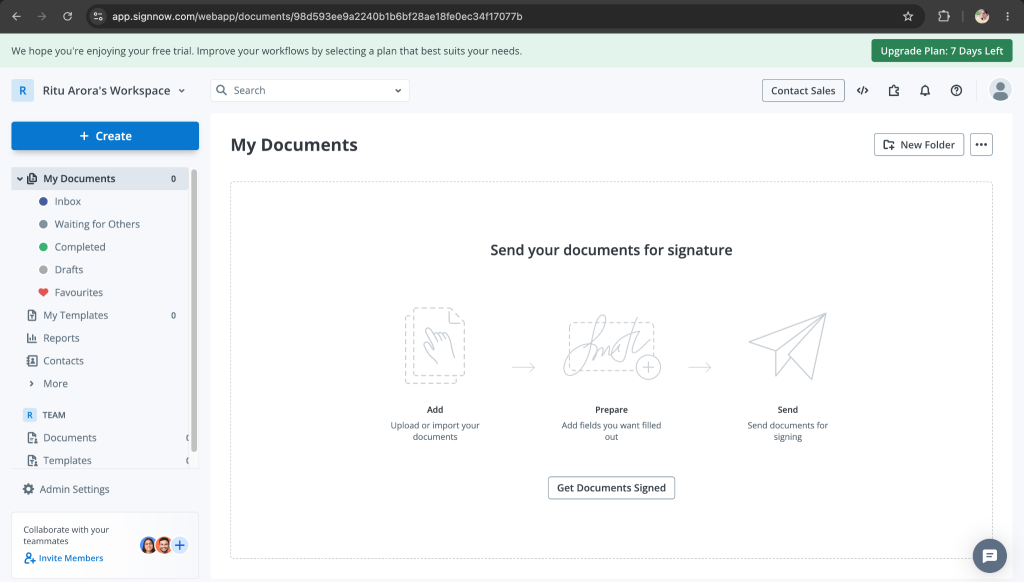
Caption: signNow’s document workspace showing documents and preparation options.
Alt text: signNow document management interface used to prepare documents for electronic signing.
Step 2: Decide on the approval structure/ Who needs to sign?
Not every invoice will have the same approval structure. A small business might need one customer signature, while a larger organisation may require an employee, manager, or authorised representative to review it first.
So, it is always better to define the roles before sending a document. This prevents unnecessary confusion, and only the concerned recipients will be added to the workflow.
Step 3: Clear Instructions and Workflow for the Recipient
If you are sending a document for signatures to any stakeholder, the workflow and actionables should be self-explanatory. Explain the required action, and provide enough context for the recipient to proceed confidently. The signNow interface provides a dedicated invitation workflow for adding recipients and preparing a signing request.
Screenshot 2 – signNow send-for-signature interface
Caption: The signNow invitation interface used to prepare a document for signing.
Alt text: signNow send invite screen showing recipient and signing-request fields.
Step 4: Make the process obvious
The recipient should not have to work out how the document functions. A good eSign experience makes the required action obvious. The document itself should provide enough context to review before signing.
This matters particularly because the signing party will be external to your organisation and they may be using a phone or another device and may not be familiar with the company’s internal approval process.
The goal is not simply to obtain a signature. It is to make sure the right person completes the right document with minimal confusion.
Step 5: Always Ready for Records
A signed invoice is only useful if the organisation can retrieve and understand it later. This is where electronic workflows have an advantage over scattered paper files and email attachments.
signNow’s stated security and compliance specifications include audit trails, TLS 1.2/1.3 in transit, AES-256 at rest, and 2FA. The platform is also listed as supporting standards and regulations including ESIGN, UETA, HIPAA with a required BAA, SOC 2 Type II, GDPR, 21 CFR Part 11, PCI DSS, ISO 27001, CCPA, and eIDAS.
At the end, a completed electronic document should be saved in a way that it can be used as part of the organisation’s records process. Finance teams should establish where completed invoices are retained, who can access them, and how they connect to the related transaction or approval.
Where Invoice eSign Fits into Real Business Workflows
Finance and Accounts Payable
Finance departments frequently deal with documents that move through several hands before payment or approval. An electronic signing workflow makes it easy with fewer manual handoffs. Teams will always know what is waiting, what has been completed, and which documents need attention.
Real Estate
Real estate processes deal with a lot of documents that may require signatures from multiple parties. The process involves invoices related to services, property commissions, construction and repairs, or vendor work. An electronic process makes it easier to treat the signature step as one part of a wider digital document workflow instead of a separate paper exercise.
Healthcare
Healthcare organisations need to be especially careful about how electronic documents are handled. SignNow specifications include HIPAA support with a BAA requirement, alongside other listed security and compliance standards.
For a healthcare organisation, the key consideration is not simply whether a document can be signed electronically. The organisation should also establish the appropriate privacy, access, and documentation procedures for the workflow involved.
Legal and Professional Services
Law firms and individual service providers often have to manage invoices alongside agreements, engagement documents, and approvals. A structured eSign workflow can make these documents easier to maintain.
The ability to maintain an electronic audit trail is useful when the organisation needs a clear record of the signing process rather than a standalone scanned signature.
HR and Employee Administration
Some organisations also encounter invoice-like approval workflows in HR administration, contractor management, and employee-related processes. This gives them a standard and consistent way to process and store documents.
What Makes signNow Worth Considering for Business Workflows?
SignNow figures provide a useful indication of its scale: 28 million users and 352 Fortune 500 companies, with clients including Apple, Walmart, FedEx, Tesla, and Xerox. Those numbers do not by themselves determine whether a tool is appropriate for a particular organisation, but they provide context around its adoption.
For pricing, one can have it at $8 per user per month when billed annually, with unlimited users on all paid plans and no envelope cap. The stated outcome figures include an average 700% first-year ROI, savings of up to six hours per week per employee, and an 80% document completion rate.
Those numbers are best considered alongside the actual workflow a business needs to implement rather than as guarantees of results for every organisation.
Three Practical Rules for Better Invoice Signing
The first rule is to prepare documents before they reach the signer. Correct information and clearly assigned fields reduce avoidable corrections.
The second is to design the workflow around roles rather than simply sending an attachment to everyone involved. Knowing who reviews, who signs, and who receives a copy creates accountability.
The third is to think beyond the signature itself. A completed invoice should be part of a traceable record that the business can retrieve later. This is where audit trails, security controls, and a consistent retention process become important.
Screenshot 3 – signNow document signing interface
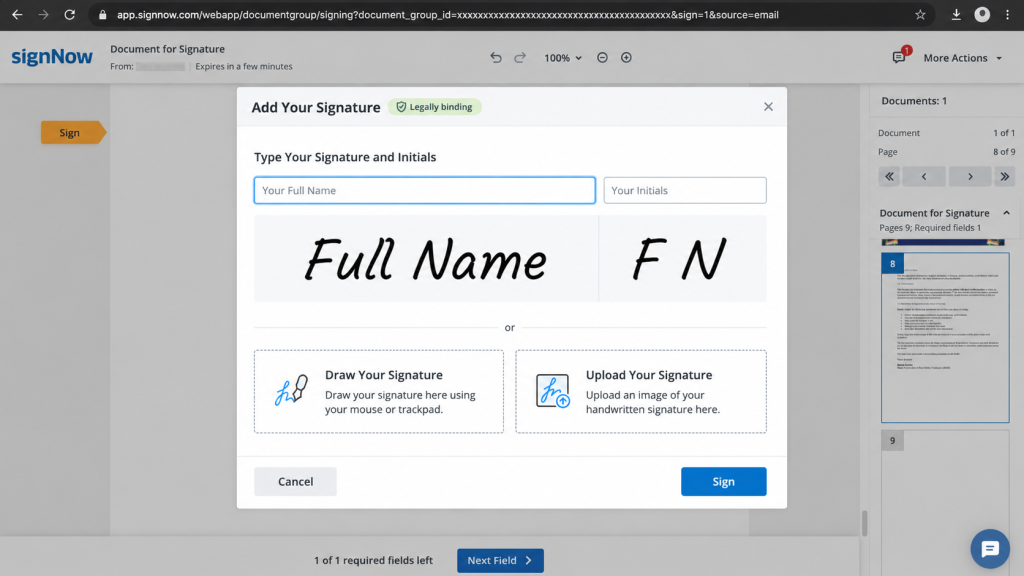
Caption: signNow’s document signing workflow showing how a signer can complete a prepared document.
Alt text: signNow electronic signature interface used to place and complete a signature on a document.
FAQ
Can an invoice be signed electronically?
Yes. An invoice can be prepared as an electronic document, assigned to the required signer, and sent for signature through an eSign workflow. The important consideration is making sure the document contains the correct information, the appropriate signer is selected, and the completed record is retained properly.
What should an invoice signing workflow include?
A useful workflow normally includes document preparation, signer assignment, sending the document for signature, completion monitoring, and record retention. The process should also account for security and auditability so the organisation can establish what document was signed and maintain an appropriate record.
How can businesses reduce delays in invoice signing?
Start by removing ambiguity. Use accurate documents, identify the correct signer, make required fields obvious, and provide clear instructions in the signing invitation. A consistent workflow also makes it easier for finance teams to identify documents that are still awaiting action rather than searching through separate email threads.